Advanced Statistics 25/26
Welcome to Advanced Statistics
This page contains the core materials for the module. Each week, we will typically complete one tutorial and one worksheet. If there are slides associated with the workshop, these will be to the respective on Canvas > Advanced Statistics > Units > Week X.
Using Posit Cloud
You can find the information on joining the Advanced Statistics Posit Cloud workspace on Canvas by going to Module Information > Module materials .
Each new project you create will have two folders:
quarto: containing a file for making notes and a file for completing the worksheet
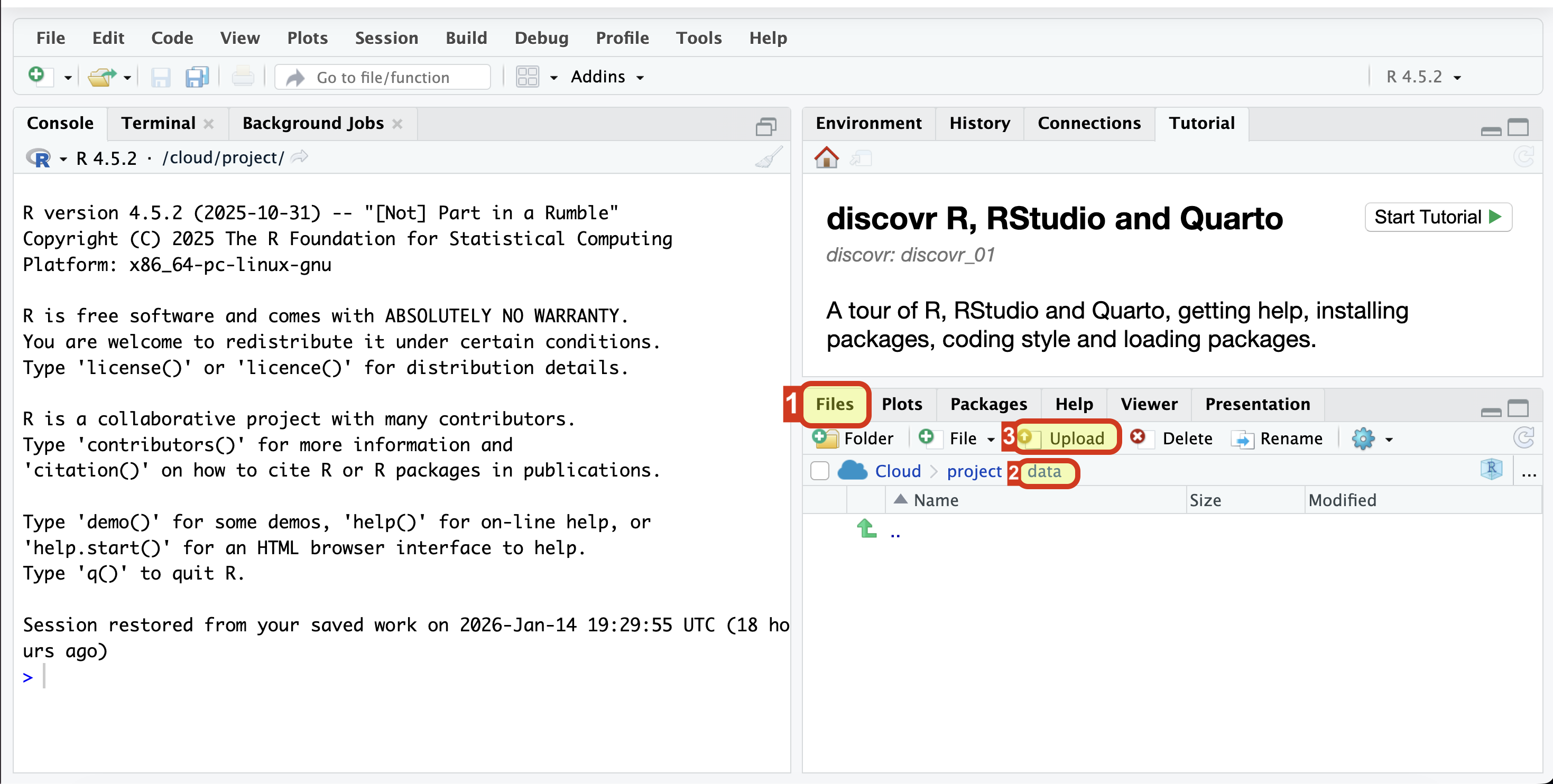
data: empty by default. For each tutorial, you will need to download the data from this page and upload it into this folder.
Downloading and uploading datasets
Each tutorial contains a link to the dataset under The data section. It might look something like this:
… the data for this scenario are stored in the file climbing_data.csv
To download the data:
Right-click on the hyperlink (or tap with two fingers)
From the pop-up menu, select “Save as” or an equivalent, like “Save linked file as” or “Save link as”
Your browser will then either ask you to choose which folder you want to store the file in, or it will go automatically into downloads.
To upload the data to Posit:
Open a project on Posit
Navigate to the data folder under “Files” (bottom right pane)
Select “Upload”. Navigate to the folder with the downloaded file and select it.
Once the data are in the correct folder, the code from the tutorial will work without any alterations.
Tutorials and suggested workflow
During the first half of the workshop, we will work through the main parts of the tutorial together - I will demonstrate how to approach tasks and highlight what things to look out for. The second part of the workshop is dedicated to independent work, in which you’re expected to complete the following exercises:
The What does this code do? section
The Worksheet
both of which will be based on the tutorial we’ve just covered. How exactly you use these tutorials will depend on how you prefer to learn. Here are some options:
Option 1: Prepare before the session
- Work through the tutorial before the session, trying out different bits of code in the Quarto file on Posit Cloud
- Listen during the demonstration to check your your understanding, perhaps make some additional notes.
- Jump straight into working on the independent exercises. Ask if you’re not sure about anything.
Option 2: Learn as you go
Treat the workshops as your first point of contact with the new material.
Listen during the demonstration to take in new information.
During the independent work, revisit any parts of the tutorial which were unclear during the demonstration. Then use the tutorial to complete the worksheet. Ask if you’re not sure about anything.
Option 3: The middle ground
Before the workshop, prepare a quarto file that contains all the code from the tutorial for that week - you don’t necessarily need to read the whole tutorial to do this.
During the demonstration, listen, run the code along with the tutor and make notes.
Jump straight into working on the independent exercises. Revisit any part of the tutorial that were unclear during the demonstration. Ask if you’re not sure about anything.
Or any combination of the three. The point is, you can either use the tutorials as a reference point or as a way to prepare for the session - whatever you choose to do is up to you, as long as you’re able to complete the independent exercises each week.
Can I complete the exercises at home?
Yes, there’s nothing stopping you from doing so. The main benefit of working from them in the session is that you’ll be able to talk to your peers and get feedback directly from the tutor.